
10 Proven Ways to Prevent Equipment Downtime Across Your Rental Locations

Every piece of equipment sitting idle in your yard is revenue you’re not earning. Typically, the challenge isn’t that downtime exists. Some downtime is planned and necessary. The real issue is when downtime goes untracked, unmanaged, and invisible across your locations. That’s what turns a routine maintenance window into lost revenue and frustrated customers.
This guide breaks down exactly how to track equipment downtime across multiple rental locations, prevent unnecessary downtime from eating into your rental KPIs (like margin), use downtime data to make smarter fleet decisions. And how to do all this with equipment rental software, not manual spreadsheets.
How Equipment Downtime Kills Revenue Growth
Equipment downtime is the silent margin killer in the rental industry. It doesn’t announce itself with a single catastrophic event — it chips away at revenue day after day, across every location, in ways that are easy to miss until the numbers tell the story.
Here’s what makes it so costly. Every hour a piece of equipment sits unavailable, you’re losing the rental revenue it should be generating. For heavy equipment, that can mean $500 to $2,000 or more per day in lost rental income, for a single piece of large equipment. But the direct revenue loss is just the beginning.
Downtime creates a cascade of secondary costs that compound quickly:
- Emergency repair premiums: Unplanned repairs can cost anywhere from 10% to00 50% more than scheduled maintenance because you’re paying rush fees for parts and potentially “emergency labor” charges.
- Lost customer confidence: When you can’t fulfill a reservation because a machine is unexpectedly down, that customer may not call back. Worse, they’ll call your competitor instead.
- Staff time wasted on firefighting: Your team ends up making calls, shuffling equipment between branches, and managing angry customers instead of generating new rentals.
- Underutilized fleet across locations: Without visibility into which units are down and where, you can’t redistribute equipment effectively. One location has idle inventory while another turns customers away.
For multi-location operators, the impact multiplies. When downtime tracking lives in spreadsheets, whiteboards, or individual managers’ heads, there’s no single source of truth. This is what creates operational gridlock — the fragmented systems and limited visibility that prevent rental businesses from reaching their full potential.
The good news? Most equipment downtime is preventable with the right systems and habits. Let’s walk through the strategies that actually work.
Tips to Prevent Rental Equipment Downtime
Preventing equipment downtime isn’t about finding one magic fix. It’s about building a system of overlapping habits, processes, and tools that catch problems before they turn into lost revenue.
Here are 10 strategies that work for multi-location rental operators.
1. Get on Top of Inventory Management
You can’t reduce downtime if you don’t know what’s happening across your fleet. This sounds obvious, but it’s where most multi-location rental businesses struggle the most.
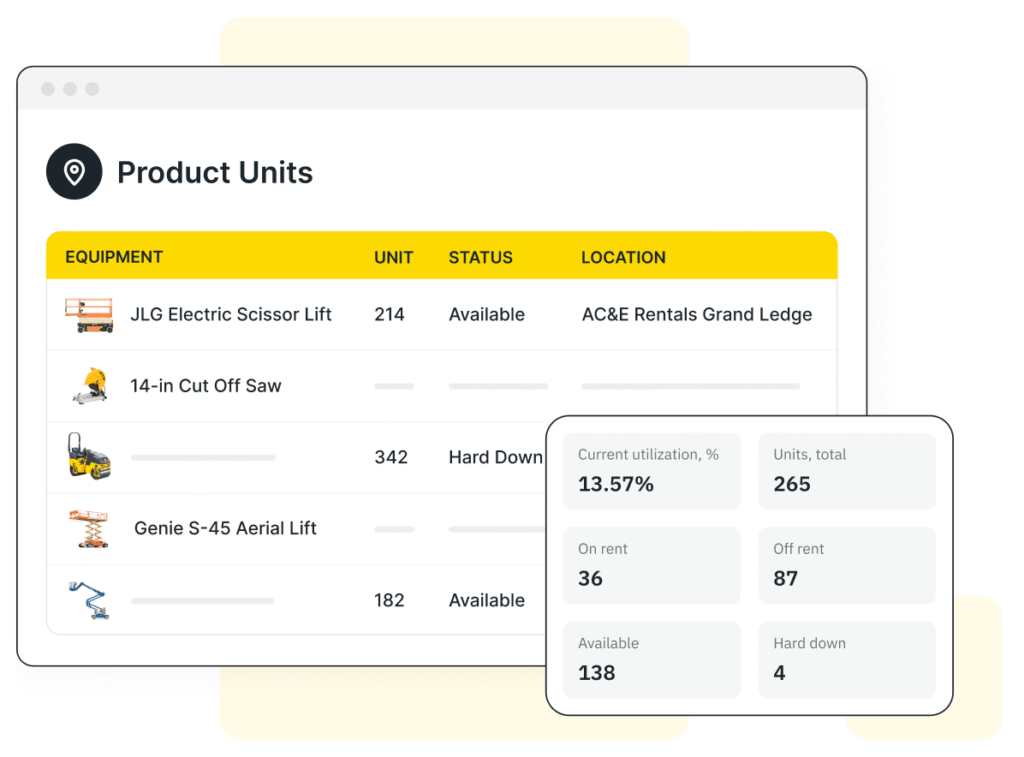
Effective equipment rental inventory management for downtime prevention means having real-time visibility into the status of every serialized asset across all your locations.
At a glance, you should be able to answer these questions:
- Which units are currently available, on rent, or in maintenance?
- Where is each unit physically located right now?
- What’s the expected return date for units that are currently out?
- Which units have been sitting in “down” status for too long without active repair work?
Without this level of visibility, downtime hides. A machine might be marked as “soft down” at one branch while sitting untouched for weeks. Meanwhile, another location could use that exact unit if someone just knew it was available for transfer.
2. Track Runtime and Schedule Maintenance When It’s Needed
Preventive maintenance is your single best play for increasing equipment uptime. The keyword is “preventive.” Waiting until something breaks means you’re paying emergency repair rates, losing rental days, and scrambling to notify affected customers.
For heavy equipment, especially, maintenance should be triggered by actual runtime hours — not by calendar dates alone. An excavator that runs 60 hours a week needs service far more frequently than one that runs 15.
Build your maintenance program around these fundamentals:
- Set service intervals by hours, not just dates. Most manufacturers recommend oil changes every 200–500 hours, depending on the machine. Track actual meter readings at every check-in.
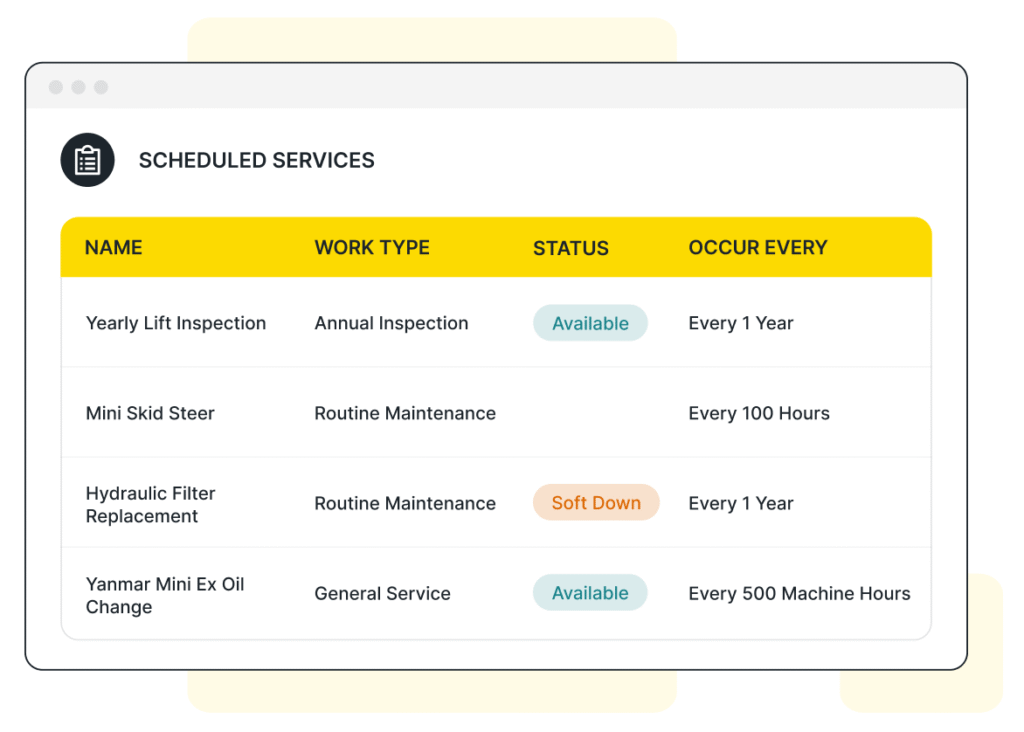
- Automate service triggers. When an operator enters updated hour meter readings at check-in, the system should automatically flag upcoming service needs and schedule them during gaps between rentals.
- Distinguish between soft down and hard down. Not every maintenance task requires pulling a unit from your fleet. A machine with a broken A/C unit might still be rentable during winter months. Use status categories that reflect actual availability.
💡 Pro Tip
Quipli’s Scheduled Services feature automates recurring maintenance tasks like annual inspections and hour-based service intervals. When a unit is checked in, your team enters the updated hour meter reading, and the system automatically triggers the next scheduled service. This means nothing slips through the cracks, even across multiple locations.
3. Use Telematics and GPS Tracking
Telematics and GPS tracking have moved from “nice to have” to essential for serious rental operations. These systems give you data that would be impossible to collect manually — and they’re particularly valuable for catching downtime risks early.
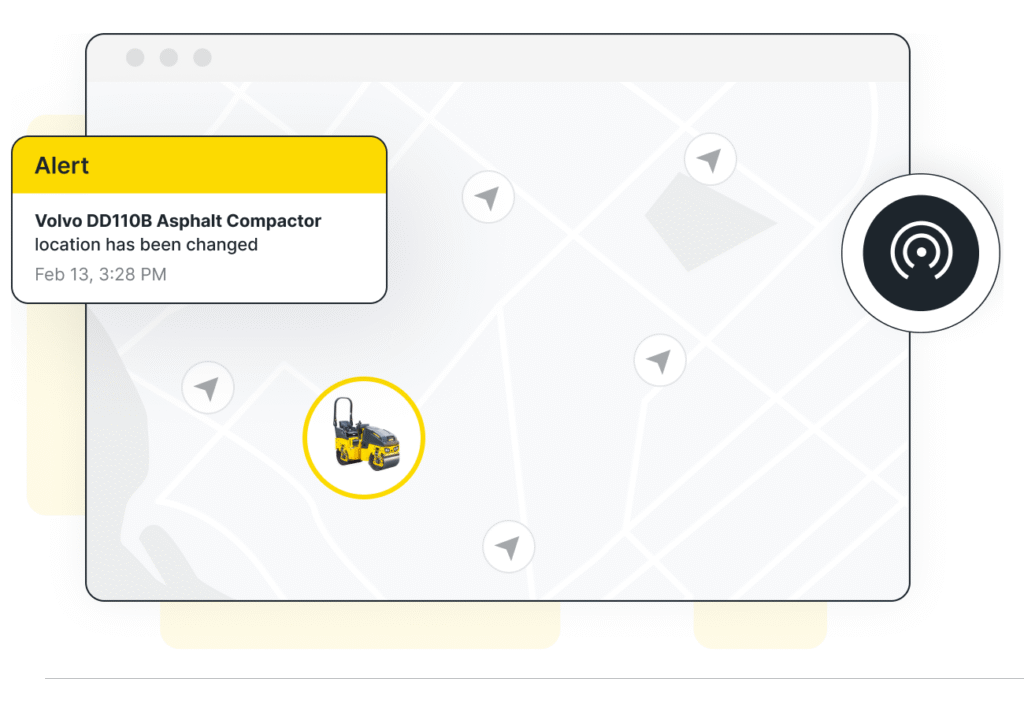
With telematics, you can monitor engine hours, idle time, fault codes, and location data in real time. This means you can identify machines that are being overworked (which accelerates wear and tear) and units that are throwing diagnostic codes before a full breakdown occurs.
For multi-location operators, GPS tracking also solves a practical problem: knowing where your equipment actually is. When machines move between job sites, branches, and maintenance facilities, physical location data helps you make faster transfer and dispatch decisions.
4. Set Up Proper Reservation and Booking Systems
Downtime doesn’t always come from mechanical failure. Sometimes it’s caused by booking chaos — double-bookings, scheduling conflicts, and equipment being reserved when it’s actually in the shop.
A proper reservation and booking system prevents this by connecting your inventory status directly to your scheduling. When a unit is marked as down for maintenance, it’s automatically removed from availability across all sales channels — your website, your counter system, and any partner integrations. No manual follow-up needed.
This is especially critical for multi-location businesses. If your east location marks a boom lift as “hard down,” your west location’s team shouldn’t be able to book it for a customer pickup. Systems that update availability in real time across branches prevent these conflicts and protect your customer relationships.
5. Train Staff on Proper Maintenance Protocols
Technology alone won’t solve downtime problems. Your staff needs to know how to use the systems you put in place — and they need clear protocols for day-to-day maintenance tasks.
Effective training should cover:
- Pre- and post-rental walkarounds: Every unit should be inspected before it goes out and when it comes back. A 5-minute walkaround catches leaks, loose components, and low fluid levels before they become expensive failures.
- Proper equipment operation guidelines: Operator misuse is a leading cause of preventable downtime. Machines that are overworked or used outside their rated capacity wear out faster and break down more often.
- When and how to escalate issues: Counter staff and drivers should know the difference between a minor issue they can flag for review and a safety concern that requires immediately pulling a unit from service.
- Consistent hour meter and status documentation: Inaccurate or missing readings undermine your entire maintenance scheduling system. Make it a non-negotiable part of every check-in.
Recommended Resource: Detailed Heavy Equipment Inspection Checklist [Free Template]
6. Use Pricing Strategically
Pricing is a downtime prevention tool that most rental operators overlook. Strategic pricing helps you balance demand across your fleet, reduce wear concentration on popular units, and incentivize renters to return equipment on time.
Consider these approaches:
Shift demand to underutilized equipment
If your newest excavator is booked solid and aging fast, adjust pricing to steer some demand toward comparable units with lower utilization.
Price for longer rental terms
Longer rentals mean fewer check-in/check-out cycles, fewer transport trips, and fewer opportunities for damage during loading and unloading.
Use late-return fees effectively
Equipment returned late throws off your entire schedule — the next renter is waiting, maintenance windows shrink, and your team scrambles to adjust. Clear late-return policies help protect your scheduling integrity.
7. Use a Digital Inspection Tool
Paper inspection forms are a liability for multi-location operations. They get lost, they’re inconsistent between branches, and the data they capture stays trapped on a clipboard instead of flowing into your maintenance and billing systems.
Digital inspection tools solve these problems by standardizing your inspection process across all locations and linking results directly to work orders, customer records, and availability status. When a technician identifies a hydraulic leak during a post-rental inspection, the finding should automatically trigger a work order and update that unit’s availability — not sit on a piece of paper waiting for someone to enter it manually.
The data from digital inspections also builds a valuable history for each unit. Over time, you can identify patterns — machines that consistently come back with the same issue, customers who return equipment in poor condition, and equipment categories that require more frequent attention.
Recommended Resource: Equipment Rental Checklist + Template & Tool
8. Strengthen Supplier Relations for Better Margins on Maintenance
When a critical part takes 6 weeks to arrive, that’s 6 weeks of lost rental revenue on that unit. Parts availability is one of the most overlooked factors in equipment downtime, especially for heavy construction equipment where components can be expensive and slow to source.
Build relationships with your key suppliers and parts distributors before you need them urgently. Strong supplier partnerships help you:
- Negotiate better pricing on commonly needed parts like filters, belts, hoses, and hydraulic components.
- Get priority access to back-ordered or hard-to-find parts.
- Maintain a working inventory of high-turnover consumables so routine service doesn’t stall waiting for a delivery.
For multi-location businesses, consider centralizing parts procurement. Buying in volume gives you better negotiating leverage, and a shared parts inventory across branches means you’re less likely to have a unit sitting hard down while the right filter is in stock at another location.
9. Report on Downtime, Weekly and Monthly
You can’t improve what you don’t measure. Downtime reporting should be a regular cadence in your operation — not something you check when there’s a problem.
At minimum, track and review these metrics weekly:
- Total units currently down (soft down and hard down) by location.
- Average days in downtime per unit. Are repairs taking 3 days or 3 weeks?
- Downtime by category. How much is planned maintenance versus unplanned breakdowns?
- Revenue impact. What’s the estimated lost rental income from units sitting in the shop?
Monthly, go deeper. Look at downtime trends by equipment category, by location, and by age of asset. Are your oldest machines dragging down fleet-wide utilization? Is one location consistently slower at completing repairs than others?
💡 Pro Tip
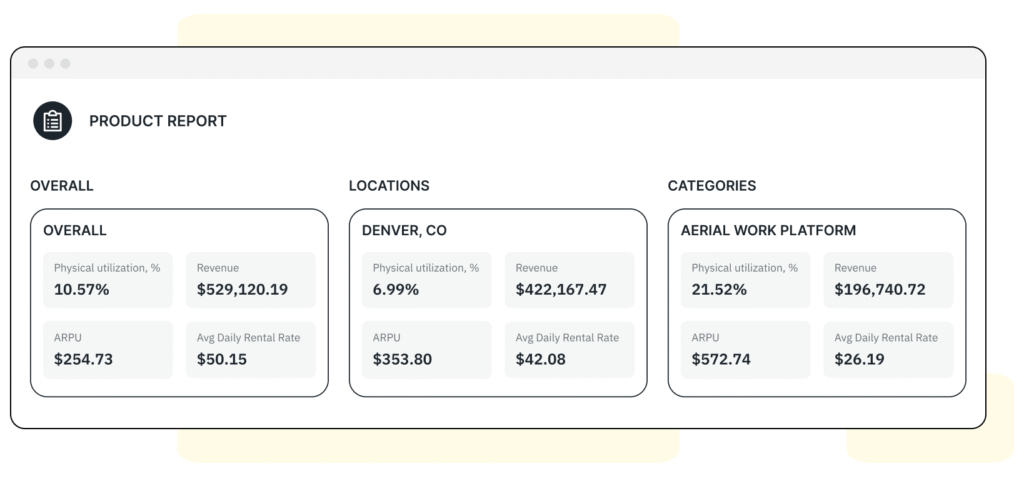
Quipli’s Product Report breaks down utilization, revenue, and average rental rates by location, product type, and category. Combined with work order data from the Service and Repair module — which tracks repair costs, downtime duration, and lifetime maintenance spend per asset — you’ll have the insights you need to make data-driven fleet decisions.
10. Use Downtime Data to Guide Purchasing
Downtime data isn’t just an operational metric — it’s a purchasing signal. When you track maintenance costs, repair frequency, and downtime duration per unit over time, you build a clear picture of which assets are earning their keep and which ones are costing you more than they generate. In the end, you can use this data to inform key fleet management decisions:
Retire chronic problem units
If a particular excavator requires repairs after every third rental, it’s time to sell it and reinvest in something more reliable.
Double down on what works
If your CAT skid steers have significantly lower downtime rates than another brand, that should influence your next purchasing cycle.
Right-size your fleet by location
Downtime patterns often reveal that certain locations are over- or under-equipped. One branch may have 3 boom lifts but only enough demand for 2, while another branch turns customers away weekly.
Time your replacements strategically
Don’t wait until a machine is unreliable to replace it. Use maintenance cost trend data to identify the point where repair costs start outpacing the unit’s revenue contribution.
The best rental businesses treat their fleet like an investment portfolio. Each asset has a cost of ownership, a revenue trajectory, and a point where it makes more sense to sell than to keep repairing. Downtime data helps you find that inflection point for every unit in your fleet.
Recommended Resource: The State of Equipment Rental Report [2026]
Other Resources
We sat down with Luke Powers of Gearflow to discuss all things backlogs, downtime, and equipment procurement, to help you expand your rental revenues.
EMBED: https://www.youtube.com/watch?v=xp4zTaz2kjA
Final Thoughts
Equipment downtime is never going to be zero — and it shouldn’t be. Planned maintenance is essential to keeping your fleet healthy, your customers safe, and your machines earning over the long haul. The goal isn’t to eliminate downtime. It’s to control it, track it, and make sure no unit sits idle longer than it needs to.
Ready to take control of equipment downtime across your locations? See how Quipli’s all-in-one equipment rental platform can help.
Advice delivered to your inbox
 Get a Quipli demo